Hiển thị các bài đăng có nhãn C#. Hiển thị tất cả bài đăng

Thứ Sáu, 9 tháng 11, 2018

Visual Studio: Show active file in solution explorer

One of the most annoying thing about Visual Studio default settings is the fact that the Solution Explorer doesn't track what files you are currently looking at. Alot of developers thought this was the only way, and had to bear the pain of flicking through the Solution Explorer while scratching their head to figure out 'where the hell I put this file?'.
Some have found a work around by using Visual Studio plugin like VS File Finder and Resharper (Ctrl + Shift + T / Resharper_GoToFile). While others found right clicking on the tab - open containing folder to be helpful enough.
There is actually a setting in Visual Studio that does this automatically.
Tools - Options - Projects and Solutions - Track Active Item in Solution Explorer
Just tick the box..and you're all set!
copyright: http://ronaldwidha.net/2008/11/26/visual-studio-show-active-file-in-solution-explorer/

Thứ Ba, 3 tháng 3, 2015

Thực thi kế thừa (trong C#)

Mô hình tiến hành thực thi kế thừa

Code ví dụ mô tả lớp Listbox được dẫn xuất từ lớp Window

using System;
using System.Collections.Generic;
using System.Linq;
using System.Text;

namespace UsingInheritance
{
    public class Window
    {
        // Hàm khởi dựng lấy hai số nguyên chỉ
        // đến vị trí của cửa sổ trên console
        public Window(int top, int left)
        {
            this.top = top;
            this.left = left;
        }

        // Mô phỏng vẽ cửa sổ
        public void DrawWindow()
        {
            Console.WriteLine("Drawing Window at {0}, {1}", top, left);
        }

        // Khai báo hai biến thành viên private
        // do đó hai biến này sẽ không thấy trong lớp 
        // dẫn xuất
        private int top;
        private int left;
    }

    // ListBox dẫn xuất từ Window
    public class ListBox : Window
    {
        // Khởi dựng có tham số
        public ListBox(int top,int left, string theContents)
            : base(top, left) // gọi khởi dựng của lớp cơ sở
        {
            mListBoxContents = theContents;
        }

        // tạo một phiên bản mới cho phương thức DrawWindow
        // vì trong lớp dẫn xuất muốn thay đổi hành vi thực hiện
        // bên trong phương thức này
        public new void DrawWindow()
        {
            base.DrawWindow();
            Console.WriteLine("Listbox write: {0}", mListBoxContents);
        }

        // thêm biến thành viên private
        private string mListBoxContents;
    }

    class Program
    {
        static void Main(string[] args)
        {
            // Tạo đối tượng cho lớp cơ sở
            Window w = new Window(5, 10);
            w.DrawWindow();

            // Tạo đối tượng cho lớp dẫn xuất
            ListBox lb = new ListBox(20, 10, "Hello Listbox");
            lb.DrawWindow();
        }
    }
}

Kết quả in ra:

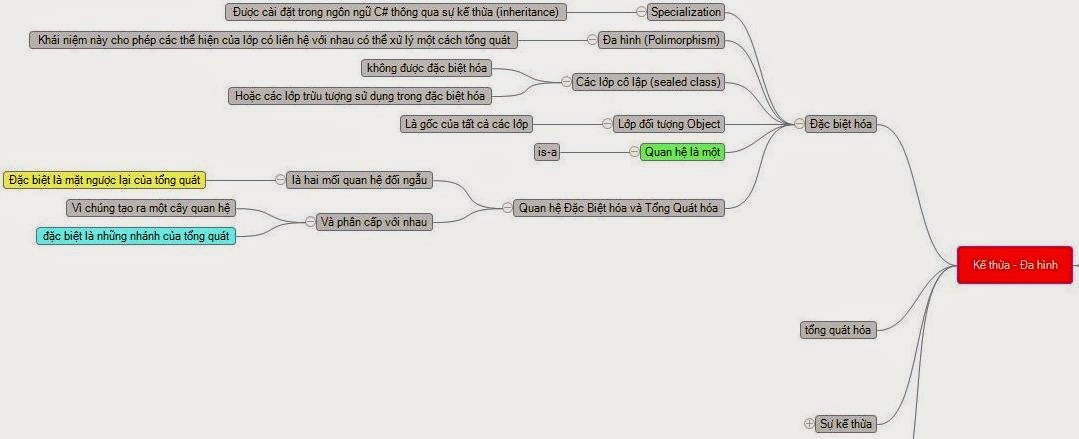
Đặc biệt hóa và tổng quát hóa (trong C#)

Mô hình mô tả sự quan hệ giữa Đặc Biệt Hóa và Tổng Quát Hóa trong C#


Kế thừa và Đa Hình

Mô hình tổng quát kế thừa và Đa hình trong C#